
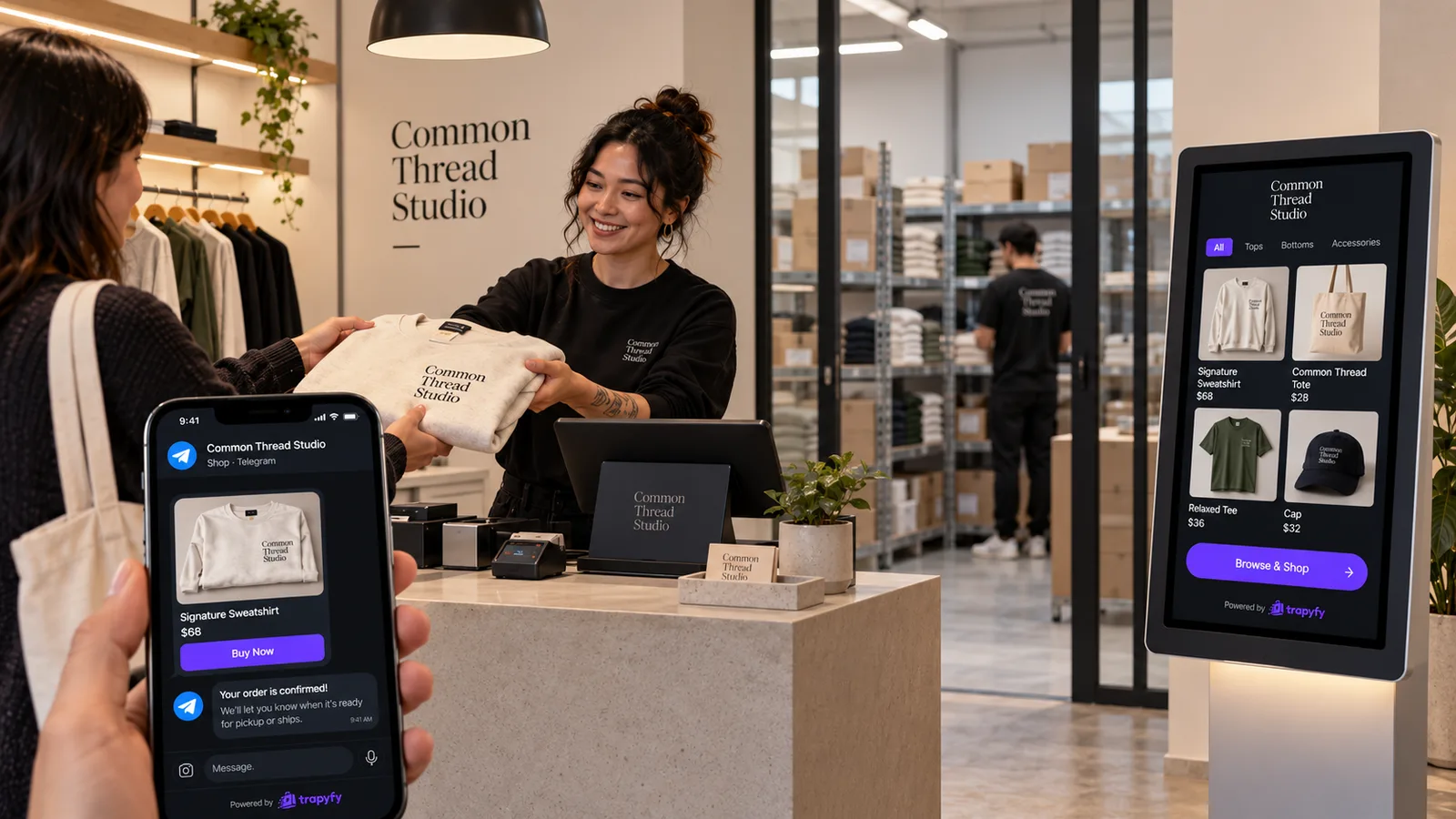
Multichannel inventory management starts to matter the day a shop sells the same product in more than one place. Say you’ve been taking orders through a Telegram shop for a year. Then you add a staffed counter, and later a self-service kiosk near the door. Each new way of selling feels like it needs its own stock figure, so you end up with a Telegram number, a counter number and a kiosk number for every product.
That’s the mistake worth avoiding. Customers buy through channels, but stock sits in a place. If the Telegram shop, the counter and the kiosk all sell the boxes on the same shelves, they should all work from the count for those shelves, not from three copies of it.
This guide covers what separates a sales channel from a warehouse, when channels should share stock, and what happens to the count when one product sells in three places on the same day.
What multichannel inventory management means for a small seller
Multichannel inventory management means controlling the stock sold through several customer-facing sales channels without keeping a disconnected quantity for each one. The sales channel decides where the customer buys; the stock location decides which physical units are available to sell.
For a small seller, multi-channel selling usually means a few concrete channels: an online shop (here, a Telegram shop), a counter where staff take payment, and perhaps a self-service kiosk. Each one is a different way for a customer to reach the same products.
It isn’t about having more stock records. A business with three channels and one stockroom has one pile of goods. The work is making sure every channel sells from that pile, that each sale reduces it once, and that a refund puts units back in the right place. In a system where those channels use the same warehouse stock, there’s no separate channel-level quantity to keep reconciled.
Why separate stock counts per channel drift apart
Picture one shelf holding 12 units of a product. To get the new counter and kiosk going quickly, someone sets the stock to 12 in the Telegram shop, 12 at the counter and 12 on the kiosk.
The business still has 12 units, not 36. But every system now believes it can sell all 12.
Keeping three separate counts honest means editing all three after every sale. In practice, that breaks down in predictable ways:
- Missed edits. A busy Saturday at the counter, and nobody updates the Telegram figure.
- Late edits. The kiosk count gets corrected at closing time, after the Telegram shop has spent the afternoon selling units that were already gone.
- Refunds. A returned item goes back on the shelf, but only one of the three counts goes back up.
- Event stock. Twenty units leave for a weekend market, and the shop’s counts still include them.
- Temporary channels. A kiosk set up for a promotion keeps its own number long after the promotion ends.
Separate systems can work: plenty of businesses keep different tools aligned through integrations or regular reconciliation. But every separate count is one more number to keep in line with the shelf. When several channels use the same warehouse stock, there isn’t a separate channel-level quantity to reconcile.
That reduces one common cause of overselling: different channels working from different manual stock counts. It doesn’t remove every cause. For the Telegram-specific side, see our guide to preventing overselling inside a Telegram shop.
A sales channel is not a warehouse
The cleanest way to think about multichannel inventory is to separate two questions that are easy to blur.
A sales channel answers: where, or how, does the customer buy? In Trapyfy, the channels are the Telegram shop, the register (staff-assisted POS) and the self-service kiosk.
A warehouse answers: where does the stock physically sit? In Trapyfy, a warehouse is any named stock location or pool. It can be the shop’s own stockroom, a main warehouse, a regional warehouse or a temporary allocation for an event. You might name them “Shop Madrid”, “Main Warehouse” and “Event Warehouse”.
Channels don’t hold stock. Warehouses do.
| Concept | Question it answers | Trapyfy examples | Holds stock? | Typical purpose |
|---|---|---|---|---|
| Sales channel | Where or how does the customer buy? | Telegram shop, register (assisted POS), self-service kiosk | No | Gives customers a way to browse, order and pay |
| Warehouse / stock location | Where do the physical units sit? | Shop Madrid, Main Warehouse, Event Warehouse | Yes | Records how many units of each product are available to sell from that place |
The relationship can be many-to-one. The Telegram shop, the register and a kiosk by the door can all sell from “Shop Madrid”. Because they sell from the same warehouse, they draw from the same warehouse stock count. A kiosk on a trade-show stand, on the other hand, might sell from a warehouse called “TRADE SHOW”, which is a separate stock pool holding only the units that went to the event.
Two other words often get mixed into this. A store in Trapyfy’s POS setup is a physical location or event where registers and kiosks operate; it isn’t a warehouse. And country decides which prices apply: Trapyfy sets prices per country, not per channel, so a kiosk set to Spain shows the same Spanish price your Telegram shop shows a customer in Spain.
One stock pool or a separate pool: choosing for each channel
Once channels and warehouses are separate in your head, each new channel comes down to one decision: should it sell from an existing warehouse, or does it need its own?
A shared pool makes sense when the channels are selling the same physical units from the same place. A shop with a counter, a kiosk on the shop floor and a Telegram shop that ships from the stockroom is the typical case. When the Telegram shop, register and kiosk are all selling from the same warehouse, each paid sale reduces that shared warehouse count.
A separate pool makes sense when stock is physically somewhere else, or when you want a fixed quantity set aside. The clearest example is an event. If you take 30 units to a fair, those units are no longer on the shop’s shelves, and the shop’s count shouldn’t pretend they are.
If you want event stock treated as a separate physical pool, place it in a dedicated event warehouse and configure the kiosk around that warehouse. The kiosk then offers only what’s in the event warehouse. Also check which countries that warehouse is assigned to, because the Telegram shop sells from warehouses that serve the customer’s country. For the rest of the event setup, see our guide to running a self-service kiosk at a trade show.
| Setup | Best for | Where stock sits | Main advantage | Main caution |
|---|---|---|---|---|
| Shared warehouse pool | Telegram shop, counter and kiosk selling from the same shop or stockroom | One warehouse used by each of those channels | One count to look after; a paid sale on any of those channels reduces it | A busy in-person day can reduce stock that is also available to the Telegram shop |
| Separate warehouse pool | Events, pop-ups, a second site, stock you want ring-fenced | A dedicated warehouse holding only the units allocated there | The allocation is visible and can’t quietly mix with main stock | Stock has to be moved there and back, and units in the separate pool aren’t on your main shelves |
Some retailers also hold back a small buffer of units for one channel. That’s a general inventory practice, not a Trapyfy setting.
What happens when the same item sells on Telegram, at the counter and at the kiosk
Here’s how shared warehouse stock behaves in Trapyfy when three channels sell from the same warehouse.
Illustrative example. The numbers are made up to show the logic.
A shop has a warehouse called “Shop” holding 12 units of Product A. The Telegram shop, the register and the kiosk all sell from “Shop”.
At the register. A customer buys 2 units at the counter. During the register sale, staff select “Shop” as the warehouse the stock is coming from. Once payment is confirmed, the “Shop” stock count drops from 12 to 10.
At the kiosk. A shopper picks up 1 unit on the kiosk. The kiosk shows a payment QR code, and the shopper pays on their own phone. Once payment is confirmed, the “Shop” stock count drops from 10 to 9.
On Telegram. In this setup, where “Shop” is the eligible warehouse for the customer’s Telegram order, the Telegram shop then sells against the same remaining warehouse stock of 9 units.
| Moment | Channel | Warehouse used | Paid quantity | Remaining “Shop” stock |
|---|---|---|---|---|
| Start of day | — | Shop | — | 12 |
| Register sale | Register (assisted POS) | Shop, selected by staff during the sale | 2 | 10 |
| Kiosk sale | Self-service kiosk | Shop, set in the kiosk’s settings | 1 | 9 |
| Telegram availability | Telegram shop | Shop, assuming it’s the eligible warehouse allocated to the order | — | Sells from the same 9 |
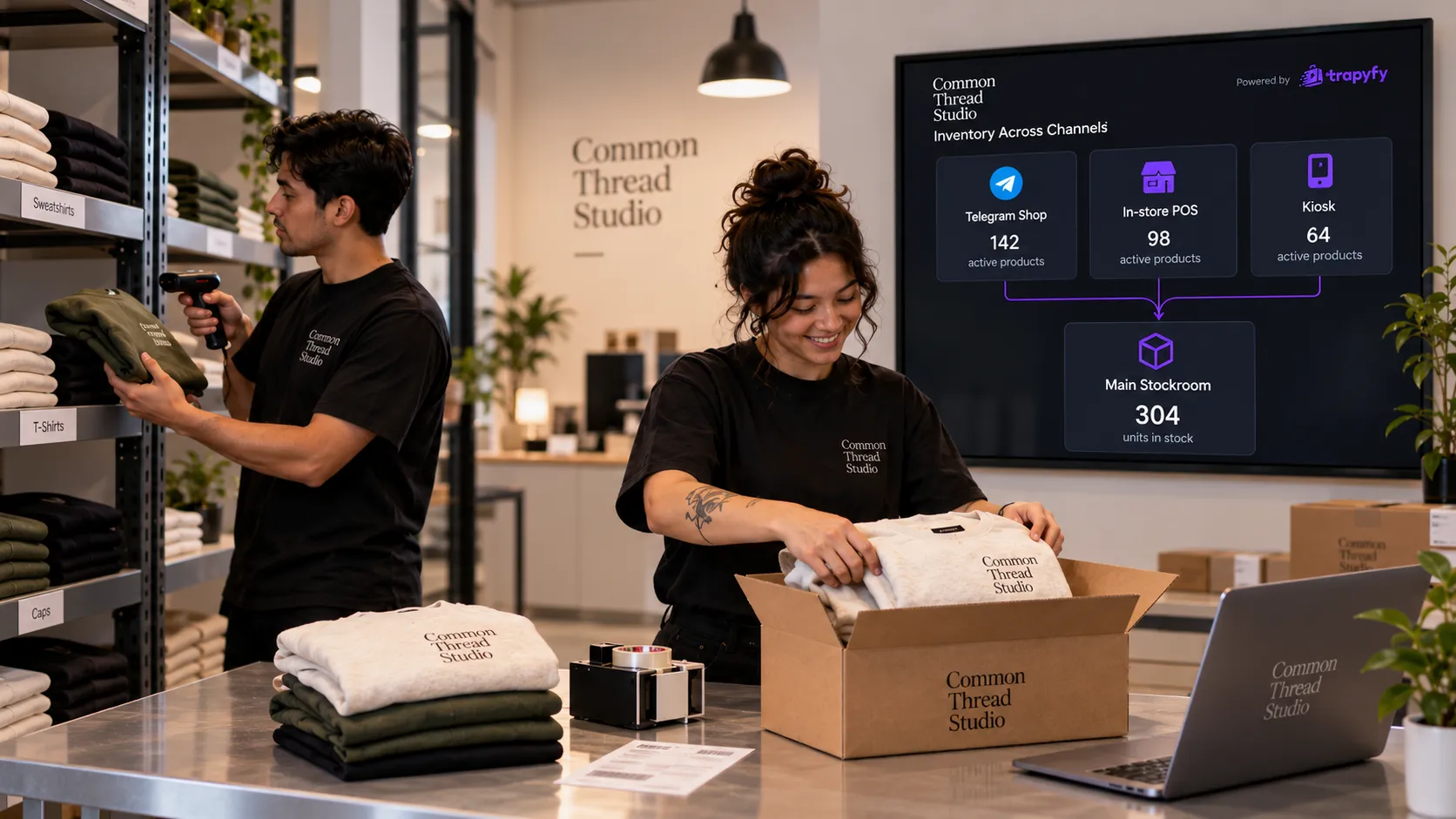
There’s no separate Telegram, register or kiosk stock quantity to reconcile in this setup, so no Telegram figure of 12, register figure of 10 and kiosk figure of 11 at closing time. Each paid sale reduces the warehouse stock those channels are using.
When the count changes. In Trapyfy, inventory is deducted when payment is confirmed. Starting an order isn’t the same as the final stock deduction: the kiosk creates the order before the shopper scans the QR code, and the count goes down once the payment is confirmed. That applies to the Telegram shop, the register and the kiosk alike.
If something comes back. If one of those orders is later refunded or cancelled, Trapyfy returns the units to the warehouse they physically left from. In this example, that’s “Shop”.
What decides whether a channel can sell a product
Sharing a warehouse is only half of it. A channel also needs to be allowed to offer the product. In Trapyfy, a product is available in a sales channel when:
- the product is Published (a Draft product is hidden from every channel);
- there’s a price for the relevant country;
- there’s stock in the warehouse being used (unless backorders are switched on for that product, which lets it be offered without stock).
All three are set on the product, warehouse by warehouse and country by country; Trapyfy’s page on warehouse stock and product visibility walks through them.
Where the channels differ is in how the warehouse is chosen. For the Telegram shop, Trapyfy looks at the warehouses assigned to the customer’s country and allocates orders from the fullest of them first; with backorders off, a product with no stock there isn’t offered. During an assisted register sale, staff select the warehouse the stock is coming from. Each kiosk is set to one warehouse and one country, and if you run several kiosks with different ranges you can assign products to specific kiosks. That changes what each kiosk shows, not where the stock sits.
| Channel | Where the customer buys | How the warehouse is chosen | When stock deducts | Product availability basis |
|---|---|---|---|---|
| Telegram shop | In the Telegram bot | Allocated from the warehouses serving the customer’s country, fullest first | When payment is confirmed | Published, priced for the customer’s country, in stock in a warehouse serving that country |
| Register (assisted POS) | At a counter or stand, with staff | Staff select the warehouse during the sale | When payment is confirmed | Published, priced, in stock in the selected warehouse |
| Self-service kiosk | On an Android tablet; the shopper pays by QR on their own phone | Set in the kiosk’s settings (one warehouse, one country) | When payment is confirmed | Published, priced for the kiosk’s country, in stock in the kiosk’s warehouse, assigned to that kiosk if you use assignments |
Payment options can differ too: Trapyfy lets you choose which payment methods appear at in-person checkout separately from the Telegram shop.
How Trapyfy runs Telegram, POS and kiosk on shared warehouse stock
In Trapyfy, the pieces fit together like this:
- One product catalogue. The Telegram shop, the register and the kiosk sell the same product records, with the same variations and SKUs.
- Stock per product, per warehouse. There’s no separate Telegram stock count, kiosk stock count or register stock count.
- Shared or separate pools. Channels that sell from the same warehouse draw from the same stock count; a dedicated warehouse keeps event or ring-fenced stock apart.
- One Orders list. Orders from all three channels land in the same list, with store and cashier details on register orders.
- Refunds go back where the units came from. A refunded or cancelled order returns its units to the warehouse they physically left from.
For catalogue, pricing and warehouse features, see Trapyfy’s product and inventory control. For the in-person side, see Trapyfy’s assisted POS and self-service kiosk. The kiosk runs in the browser on an Android tablet, and shoppers pay by QR on their own phone with card, Apple Pay, Google Pay or crypto, depending on the methods you enable through Niftipay.
When one location becomes several
Multichannel and multi-location are different problems. Everything above works with a single warehouse. Once you have several physical stock locations, a second question appears: which warehouse should a particular sale come from?
Trapyfy answers that differently per channel. The kiosk sells from its configured warehouse, and staff choose at the register. For the Telegram shop, Trapyfy allocates orders from the fullest eligible warehouse first, so moving stock between locations can change which warehouse future Telegram orders draw from. If that’s where your business is heading, our guide to running stock across several warehouses covers the strategy.
A checklist before you open another sales channel
This is practical guidance built from the stock model above, not a Trapyfy setup wizard. Run through it before a new counter, kiosk or temporary sales point takes its first order.
- Decide which warehouse the channel sells from: an existing one or a dedicated one.
- Check every product you want there is Published.
- Confirm the warehouse actually holds the stock. Count the shelf, not last month’s figure.
- Confirm a price exists for the relevant country.
- Decide whether to share the main pool or separate the stock. If the units physically leave, give them their own warehouse.
- Test a paid order end to end and check the count drops in the right warehouse.
- Test a refund and check the units return to the warehouse they came from.
- Find the test order in the Orders list, alongside your Telegram orders.
- Brief staff on register sales, including which warehouse to select.
- For a kiosk, check its warehouse and country settings before opening.
Frequently asked questions
What is multichannel inventory management?
Multichannel inventory management is controlling the stock you sell through several sales channels, such as a Telegram shop, a counter and a kiosk, without keeping a separate quantity for each one. The channels decide where customers buy; the stock location decides which physical units can be sold. Done well, every channel sells from a known stock count and each sale reduces it once.
What’s the difference between a sales channel and a warehouse?
A sales channel is where or how the customer buys, such as a Telegram shop, a staffed register or a self-service kiosk. A warehouse is where the stock physically sits, such as a shop stockroom, a main warehouse or an event allocation. Channels don’t hold stock; warehouses do. Several channels can sell from one warehouse, and a channel can also sell from a separate one.
Can Telegram, POS and kiosk share the same stock?
Yes, when they sell from the same warehouse. In Trapyfy, a paid sale on the Telegram shop, the register or the kiosk reduces that warehouse’s stock count, and the other channels using that warehouse sell from what remains. If a channel sells from a different warehouse, such as a dedicated event warehouse, it uses a separate stock pool.
When does Trapyfy deduct inventory after a sale?
Trapyfy deducts inventory when payment is confirmed. Creating an order is not the final deduction point: a kiosk order, for example, is created before the shopper scans the payment QR code, and the stock count goes down once payment is confirmed. The same rule applies to the Telegram shop, the register and the kiosk.
Do I need to sync inventory if every channel uses the same warehouse stock?
Not as separate channel-level stock counts inside Trapyfy. When the Telegram shop, the register and the kiosk use the same warehouse, they draw from that warehouse count rather than keeping their own channel quantities, so there’s nothing between them to reconcile. You still need to keep the warehouse count itself accurate, for example by checking it against the shelf after deliveries or events.
Should a kiosk have its own stock or share the shop’s?
It depends on where the stock physically is. A kiosk on the shop floor, selling the same units as the counter and the Telegram shop, can usually share the shop’s warehouse. A kiosk at a trade show or pop-up, selling units that have left the shop, is better served by a dedicated warehouse holding only the stock you took there.
What happens when an order is refunded?
In Trapyfy, when an order is refunded or cancelled, its units return to the warehouse they physically left from, not to wherever you have since moved stock. A refunded register sale taken from “Shop” goes back to “Shop”, even if you’ve moved other units around since. That keeps each warehouse’s count tied to the physical stock it actually holds.
Three ways to sell, one count to trust
Adding a counter or a kiosk to a Telegram shop shouldn’t mean tripling your stock admin. Keep the line clear: channels are where customers buy, warehouses are where stock lives. Point the channels that share shelves at the same warehouse, give stock that travels its own warehouse, and every paid sale comes out of a count you can check against the real thing.
When you’re ready to run your Telegram shop, register and kiosk from the same warehouse stock, you can create your Trapyfy account and set up your first channel.